 Written by
 Audience: platform / data engineers planning the data-movement and cutover phase of a Snowflake Postgres migration.
On this page
- Read the schema from the source, not from a file
- Run the load from inside SPCS, not from a laptop
- Loading Snowflake Postgres: Arrow batches into a raw COPY buffer
- Deploying to Snowflake Postgres: the CI/CD changes
- The cutover: hard switch, single-digit minutes
- Rollback: a reverse-migration script with three write modes
This is the cutover chapter of our migration of an online transaction processing (OLTP) workload onto Snowflake Postgres. The parent article covers why we moved and what the architecture became. This one is the part with a date attached: getting 45M rows across, switching production over, and being able to put it all back if the night went badly.
Three of the decisions below were not obvious when we started. Where to run the migration from. How to hand the rows to Postgres. And UNLOGGED tables, which we expected to help and which did not. Each is here with what it cost to find out.
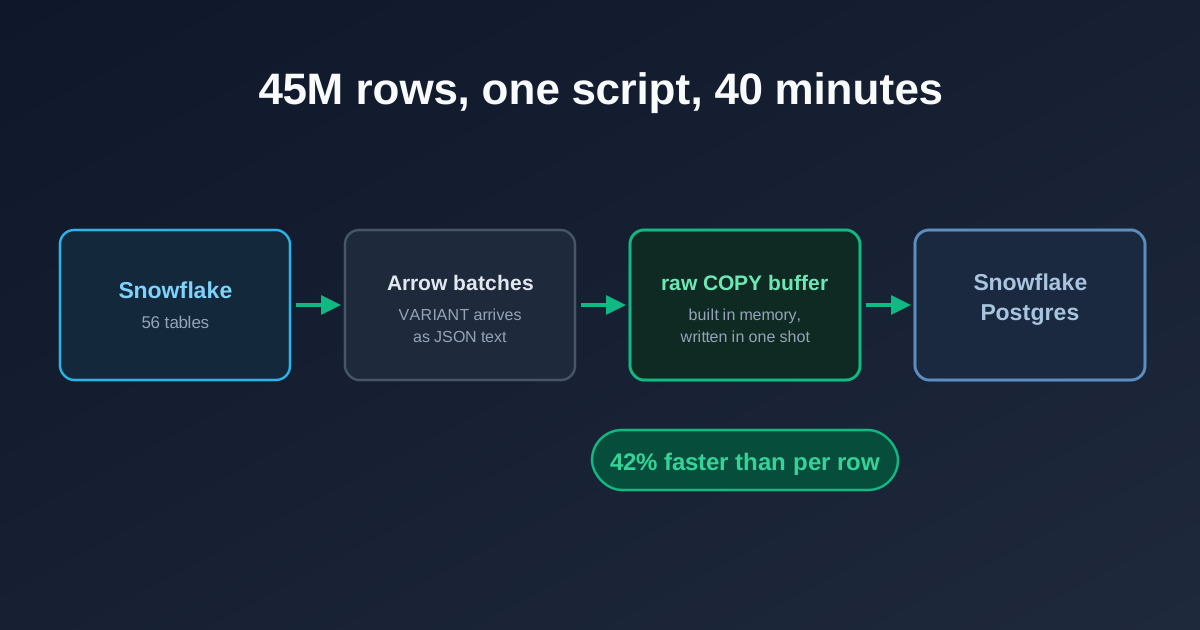
The load path. VARIANT columns arrive from Snowflake already serialised as JSON text, so the bytes go straight into a TEXT-format COPY buffer with nothing to re-encode in between.
Read the schema from the source, not from a file
The script reads its schema at runtime, with DESC TABLE against the live Snowflake source, rather than from checked-in data definition language (DDL) files.
That costs a few lines and removes a class of failure. A bulk load is a bad place to discover that a definition in a file and the table it describes have moved apart, because the run stops halfway, some tables across and some not, with the clock going. Building against the live schema means the question never comes up.
Run the introspection as its own audit step days before the migration rather than on the night. Whatever it reports, you then have days to deal with it.
Run the load from inside SPCS, not from a laptop
The obvious way to run a one-off migration is from a developer machine: connect to Snowflake, pull the rows down, push them into Postgres. We ran it from a container inside Snowpark Container Services instead, as an EXECUTE JOB SERVICE, for two reasons.
The rows never leave the cloud. A laptop run is Snowflake to laptop to Postgres: two hops across the public internet with an office uplink in the middle of them. From inside SPCS both legs stay between managed services in the same region. Across 45M rows that is the difference between the runtime being dominated by the load and dominated by your broadband.
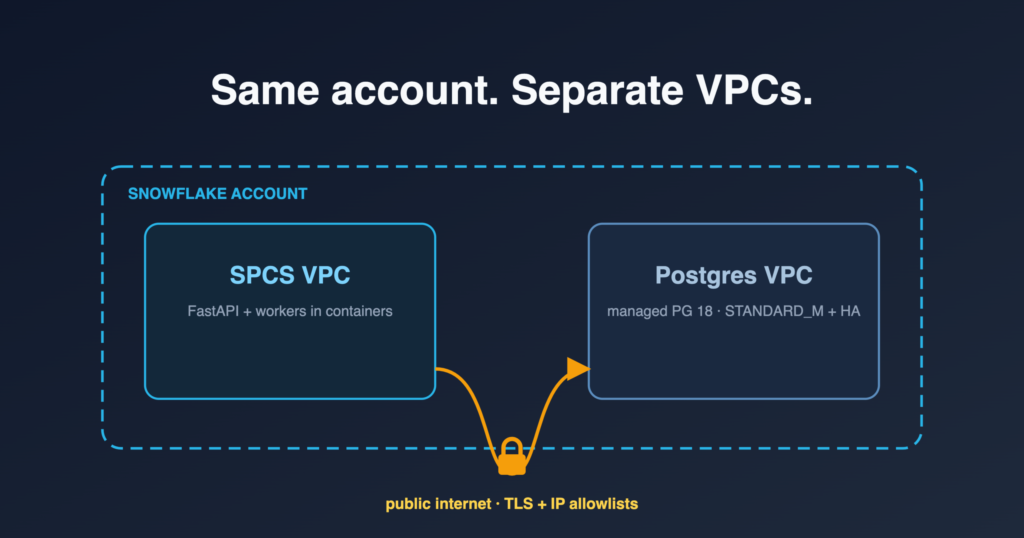
It rehearses the path production will use. The container reaches Postgres through the same route the application does, PG_EAI and the ingress allowlist included. If that route is wrong you find out on a dry run rather than at cutover. A laptop run proves nothing about it, because a laptop comes in through its own separate allowlist entry.
Loading Snowflake Postgres: Arrow batches into a raw COPY buffer
The naive load is a per-row psycopg3 cursor.copy().write_row(). It works, but on the large JSONB tables it was slow enough to matter.
Two changes made it 42% faster. fetch_arrow_batches() from snowflake-connector-python avoids per-row cursor overhead on the read side. The bigger win is that VARIANT columns come out of Snowflake already serialised as JSON strings, so there is nothing to re-encode: the bytes go straight into a TEXT-format COPY buffer built in memory and written in one shot.
# SF → PG, per table, exploiting that VARIANT comes out as JSON text
sf_cur = sf_conn.cursor()
sf_cur.execute(f"SELECT {col_list} FROM {src}")

buf = bytearray()
for batch in sf_cur.fetch_arrow_batches():
    for row in batch.to_pylist():
        # `_to_copy_text` handles NULL, tab, newline, backslash escaping.
        buf += b"t".join(_to_copy_text(v) for v in row.values()) + b"n"

with pg_conn.cursor().copy(f"COPY {dst} ({col_list}) FROM STDIN") as cp:
    cp.write(bytes(buf))
The table that motivated this carries roughly 40 KB of JSONB per row, where per-row escaping and write calls dominated everything else. Most of the attention went into _to_copy_text. TEXT-format COPY needs NULL, tab, newline and backslash all escaped correctly, and a mistake there raises nothing at load time, it just writes bad data.
We also tried UNLOGGED tables, expecting a win. Loading into one skips write-ahead log (WAL) traffic, which sounds like the right trade for a bulk load, but switching logging back on afterwards costs more than the WAL it saved. Load into normal tables.
Two details about ordering and scale:
- Build indexes and constraints after the data load, not before. All 39 DDL statements complete inside the migration window without needing a separate parallelisation pass.
- Total runtime was ~40 minutes end to end, dominated by the largest payload tables. The long tail is a handful of tables, not the 56.
Deploying to Snowflake Postgres: the CI/CD changes
Changes to the continuous integration and deployment (CI/CD) pipeline were minimal:
- Add
psycopg[binary,pool]to each module’s requirements - Add PG environment variables (
PG_HOST,PG_PASSWORD, and so on) to the SPCS service spec via GitHub Secrets andenvsubst - Add
PG_EAItoEXTERNAL_ACCESS_INTEGRATIONSon every service that talks to Postgres - Schema migrations run as a separate
EXECUTE JOB SERVICEstep, not a GitHub Actions step
That last bullet is a hard constraint. GitHub Actions runners cannot reach the Postgres instance at all, because they have no entry in the IP allowlist and their egress addresses are not stable enough to add one. Both schema migrations and the data load have to run from inside SPCS as an EXECUTE JOB SERVICE, from a container with PG_EAI attached. A migration plan that assumes a CI runner can talk to the database will need reworking. The networking write-up covers why the allowlist works the way it does.
The cutover: hard switch, single-digit minutes
Hard cutover, no dual-write. The workload allows it: an internal tool with fewer than 20 concurrent users, where single-digit-minute downtime needs no advance warning. A customer-facing system on the same architecture should not copy this step.
The procedure that worked:
- Tag the last Snowflake-only commit on
mainbefore merging any Postgres code, so there is an unambiguous ref to deploy from if you need to cut back. - Suspend SPCS worker services (
ALTER SERVICE ... SUSPEND). - Final incremental sync of the state-bearing tables, to catch last-minute Snowflake writes.
- Verify row counts (
--dry-run). - Merge the Postgres branch to
main; CI auto-deploys. - Watch
/health/db, worker logs and UI flows for an hour.
Step 1 is easy to skip and worth keeping. The tag costs nothing on the night, and without it a cut-back begins with someone reconstructing the right commit from git log under pressure.
Rollback: a reverse-migration script with three write modes
A rollback plan that only redeploys the old code is not a rollback plan, because the moment you cut over, the Postgres tables start accumulating state that Snowflake has never seen. So the reverse-migration script syncs Postgres back to Snowflake for the tables that gather state after cutover: control tables and state managers.
It is group-based and survey-centric, with three write modes. Pick one per destination table, not one for the whole script, which was the mistake we nearly made:
- merge:
MERGE INTO ... USING (SELECT FROM staging)for state tables and survey metadata, where post-cutover writes update existing rows - delete_insert:
DELETE WHERE survey_id IN (...)then bulk insert, for child tables (respondents, responses, bot scores) where partial reconstruction would be a mess - append:
INSERTonly, for time-series and audit logs that never get updated
Coupled with --ref <pre-cutover-tag> deploys via workflow_dispatch, cut-back fits the same downtime budget as the forward cut. A rollback that takes an hour after a five-minute cutover is one nobody will authorise at 2am.
We kept the Snowflake operational tables read-only for two weeks before archiving them. Nothing needed them, but two weeks of being able to check was worth the storage.
FloreData leads the platform team at a market research company. The migration and cutover described here ran in production.
The Snowflake Postgres series: the business case · the migration write-up · cross-VPC networking · the psycopg3 connection layer · the migration script and cutover · mirroring back into Snowflake.