 Written by
 Audience: platform / data engineers wiring an SPCS application (or any external client) to a Snowflake Postgres instance.
On this page
This is the networking chapter of our OLTP migration onto Snowflake Postgres. We decided to give it its own article because it was the part that surprised us most and the part most likely to cost you an afternoon.
Three pieces make it work: a POSTGRES_INGRESS network policy for who can reach the instance, an External Access Integration (EAI) so containers can reach out, and SPCS egress IPs that expire every 90 days.
The surprise: Snowflake Postgres sits in its own VPC
SPCS and Snowflake Postgres run in separate VPCs. Confirmed with Snowflake support. Traffic between them traverses the public internet, even within the same account. Mitigated by SSL (sslmode=require, mandatory) and IP allowlists. If you assume an internal VPC fabric like RDS-in-the-same-VPC-as-your-EKS-cluster, your latency budget and your security review will both be wrong.
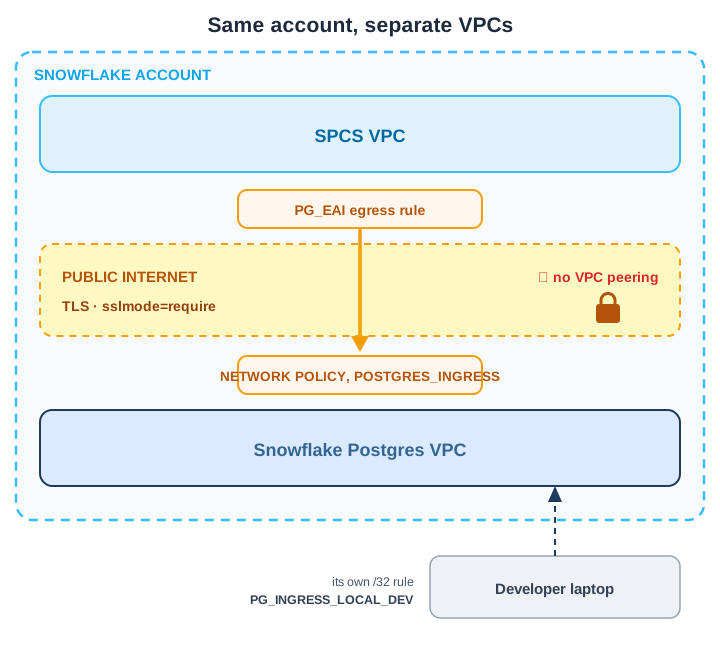
The two VPCs never peer, so every query leaves the account’s network and comes back in through the ingress policy. A developer laptop is admitted separately, by its own rule.
There are two distinct networking concerns: who can connect to the instance (ingress), and how your containers reach out to it (egress).
Ingress: who can connect to Snowflake Postgres
Snowflake Postgres blocks all inbound by default. Attach a NETWORK POLICY whose rule is in POSTGRES_INGRESS mode (not standard INGRESS, and IPV4-only, with no HOST_PORT or VPC endpoint rules):
CREATE OR REPLACE NETWORK RULE pg_ingress_from_spcs
  TYPE = IPV4
  VALUE_LIST = ('<spcs-egress-cidr-1>', '<spcs-egress-cidr-2>')
  MODE = POSTGRES_INGRESS;

CREATE OR REPLACE NETWORK POLICY spcs_pg_policy
  ALLOWED_NETWORK_RULE_LIST = ('pg_ingress_from_spcs');

ALTER POSTGRES INSTANCE <pg-instance>
  SET NETWORK_POLICY = 'spcs_pg_policy';
Run those three in that order. The policy has to resolve the rule by name, and the instance has to resolve the policy, so getting ahead of yourself just produces an object-not-found error. The failures worth knowing about are the quiet ones. Postgres ingress and egress rules are limited to TYPE = IPV4 for now. Rules in any other mode, plain INGRESS included, are ignored when a Postgres instance uses the policy. And the instance reads only ALLOWED_NETWORK_RULE_LIST and BLOCKED_NETWORK_RULE_LIST; the ALLOWED_IP_LIST and BLOCKED_IP_LIST properties you may be used to setting on a policy are ignored (source). None of those three raise an error. The last two leave you holding a policy that looks populated in DESCRIBE and an instance that admits nobody, because inbound is denied by default and nothing you wrote counted as an allow.
SPCS egress IPs come from SYSTEM$GET_SNOWFLAKE_EGRESS_IP_RANGES(), which returns one row per CIDR range with IP_CIDR_RANGE_EFFECTIVE and IP_CIDR_RANGE_EXPIRATION beside it. A new range shows up in that output at least 60 days before it starts carrying traffic (source), and no address lives indefinitely: Snowflake’s engineering team describes them as coming with “a 90-day expiration to ensure that users automate firewall rules for any updates” (source). Read the two columns rather than assuming a fixed window, because the dates on a given row often sit much further out than 90 days. The ranges are scoped to your deployment’s region and shared with every other Snowflake account in it.
The check is a diff: the function’s rows against the value_list that DESCRIBE NETWORK RULE reports for the rule you attached. Snowflake suggests running it daily or weekly, and again a few days before any expiry date you can see coming. We wrote the weekly task and never turned it on. It sits in the repo suspended, and we call the refresh procedure by hand when new ranges show up. Two things made automation more trouble than it was worth: SYSTEM$GET_SNOWFLAKE_EGRESS_IP_RANGES() called from inside a stored procedure, and EXECUTE IMMEDIATE against a rule a policy already references. With 60 days of warning and a handful of rotations a year, a task you have to monitor costs more attention than a command you run:
CREATE OR REPLACE TASK refresh_pg_ingress_task
  WAREHOUSE = OPS_WH
  SCHEDULE = 'USING CRON 0 0 * * 0 America/New_York'
AS
  CALL refresh_pg_ingress_rule();

-- We leave the RESUME commented out and run CALL refresh_pg_ingress_rule() manually:
-- ALTER TASK refresh_pg_ingress_task RESUME;
Critical update gotcha. Once anything is attached, ALTER is the only safe verb. CREATE OR REPLACE NETWORK POLICY against a policy an instance is using detaches it and blocks all connections; CREATE OR REPLACE NETWORK RULE against a rule referenced by a policy fails with “Cannot drop”. Use ALTER NETWORK POLICY ... SET ALLOWED_NETWORK_RULE_LIST = (...) and ALTER NETWORK RULE ... SET VALUE_LIST = (...) to update in place. This is the single mistake most likely to lock you out of your own database.
And the way back. Snowflake guards this mistake everywhere else. You “cannot execute a CREATE OR REPLACE NETWORK POLICY command to replace an existing network policy if that policy is currently assigned to an account, security integration, or user” (source). Postgres instances are not on that list. The recovery is undramatic, though, because the fix does not travel the path you just broke. The policy is attached to the instance, not to your account or your user, and ALTER POSTGRES INSTANCE ... SET NETWORK_POLICY is ordinary Snowflake SQL: it runs from a worksheet, over a connection the Postgres ingress policy has no say in. Re-attach the policy, or UNSET NETWORK_POLICY and rebuild it. Then wait before deciding whether it worked, because the docs put policy changes at “up to 2 minutes to take effect”, which is comfortably long enough to convince you the fix failed. The account-level version of this error is far less forgiving: lock an account policy against your own address and the only bypass is MINS_TO_BYPASS_NETWORK_POLICY, which only Snowflake can set, so the fix becomes a support ticket.
SPCS egress: letting containers reach out to PG
Same pattern you’d use for any external API egress: a HOST_PORT egress rule plus an External Access Integration (EAI), then grant the EAI to your service roles and attach it to each service alongside whatever EAIs the service already has:
CREATE NETWORK RULE pg_egress_rule
  MODE = EGRESS
  TYPE = HOST_PORT
  VALUE_LIST = ('<pg-hostname>.postgres.snowflake.app:5432');

CREATE EXTERNAL ACCESS INTEGRATION PG_EAI
  ALLOWED_NETWORK_RULES = (pg_egress_rule)
  ENABLED = TRUE;

ALTER SERVICE MY_FASTAPI_SERVICE
  SET EXTERNAL_ACCESS_INTEGRATIONS = (<existing-eais>, PG_EAI);
Without PG_EAI attached, the container cannot resolve the hostname, and the error says so. Egress is blocked at DNS, so what comes back is UnknownHostException or “Temporary failure in name resolution” rather than a refused connection or a timeout; through psycopg it surfaces as could not translate host name ... to address. Snowflake documents that same symptom for two causes, the integration not being referenced by the service and the host not being in the rule (source). This bit us during the first deploy attempt.
The shape of the failure tells you which side to fix. A name-resolution error never left the container, so look at egress: the EAI attachment, or the hostname in VALUE_LIST. A connection that resolves and then hangs did leave, which puts the ingress policy and the SPCS egress ranges in scope instead. Two further egress constraints are easy to trip over. SPCS accepts network rules for ports 22, 80, 443 and 1024 upwards only, and a service referencing a rule with any other port fails to create rather than failing to connect. And there are no wildcards, so VALUE_LIST needs the full hostname, never *.postgres.snowflake.app.
Local-dev access to Snowflake Postgres
Your laptop’s public IP needs its own ingress rule, separate from the SPCS one. The mechanics are three lines. The part worth designing is where the list of allowed addresses lives.
SET VALUE_LIST replaces the whole list. There is no add and no remove. The documentation is blunt about it: “Using this command is not additive; previously specified values are removed when you set a new value list.” Every update therefore has to name every address you still want allowed, and anyone who runs it with a partial list quietly locks out everyone missing from it.
You can read the current values back, with DESCRIBE NETWORK RULE and its value_list column, so a read-modify-write against live state is possible. We don’t do that. Live state is a poor source of truth here: two people updating on the same afternoon overwrite each other, and nothing records who added an address or why. A file in the repository gets reviewed, keeps a history, and gives the script one list to write:
# ops/pg_dev_ips.yml
team:
  - 203.0.113.42/32     # dev laptop, home
  - 198.51.100.7/32     # dev laptop, office
  - 192.0.2.15/32       # jump box
import urllib.request, yaml, snowflake.connector

# Whoever is running this, wherever they are today
my_ip = urllib.request.urlopen("https://ifconfig.me", timeout=5).read().decode().strip()

# The tracked file is the source of truth, not whatever is on the rule right now
with open("ops/pg_dev_ips.yml") as fh:
    team_ips = yaml.safe_load(fh)["team"]

all_ips = sorted({f"{my_ip}/32", *team_ips})
value_list = ", ".join(f"'{ip}'" for ip in all_ips)

# ALTER, not CREATE OR REPLACE
with snowflake.connector.connect(**conn_args) as cn, cn.cursor() as cur:
    cur.execute(f"ALTER NETWORK RULE PG_INGRESS_LOCAL_DEV SET VALUE_LIST = ({value_list})")
Editing in place with ALTER keeps the rule attached to every policy and instance that already references it, including any active point-in-time-recovery (PITR) fork, so nothing needs re-attaching. Re-run on ISP rotation, VPN change, or whenever you’re working from a new location.
FloreData leads the platform team at a market research company. The setup described here runs in production.
The Snowflake Postgres series: the business case · the migration write-up · cross-VPC networking · the psycopg3 connection layer · the migration script and cutover · mirroring back into Snowflake.