 Written by
 Audience: platform / data engineers running Snowflake Postgres who want the operational data continuously mirrored back into Snowflake for analytics.
On this page
- 1. First, put primary keys on every table you mutate
- 2. Scope the mirror and give yourself WAL headroom
- 3. Create the mirror
- 4. Watch the snapshot
- 5. Check that the mirror is actually correct
- 6. If it goes wrong: the kill switch
- 7. Gotchas that will cost you an afternoon each
- 8. Limits, and when to skip mirroring
If your application database is Snowflake Postgres, your analytics live one account away
from your operational data and you need a way across. The usual answer is a scheduled bulk
export, and it works, but you pay for it every night: 24 hours of staleness, a multi-hour
job reading the whole database out of production, and a COPY INTO that breaks whenever
someone adds a column.
Native CDC mirroring replaces all of that. You declare what to mirror, Snowflake maintains a read-only copy in a target database, and changes flow continuously. This is the setup guide: what to fix before you start, how to create and watch the mirror, how to check it actually worked, and how to stop it if it doesn’t.
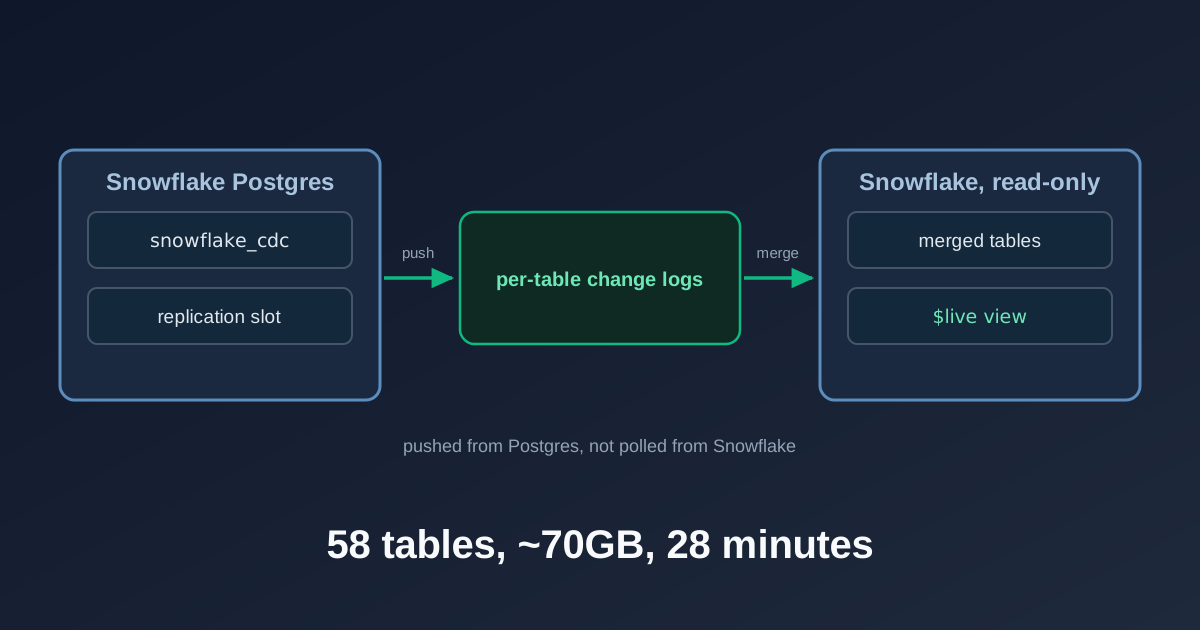
Changes are pushed from the Postgres side, not polled from Snowflake. The refresh interval controls how often they merge into the target tables, and the $live view reads across the gap.
The system this was built on, for calibration: a STANDARD_M Snowflake Postgres instance
running PG 18.x with HA enabled and 340GB of storage, holding the operational database for
a survey-pricing platform (FastAPI plus worker services on SPCS). The mirror covers 6
schemas, 58 tables and roughly 70GB, with a 23GB table of 65.8M rows at the top end and a
continuously updated JSONB-heavy pricing table as the hot spot.
1. First, put primary keys on every table you mutate
This is the step that will actually cost you time, and it has nothing to do with Snowflake’s control plane. Do it weeks before you plan to mirror anything.
Mirroring sets REPLICA IDENTITY NOTHING on any table without a primary key, and Postgres
then refuses UPDATE and DELETE on that table at the source. The docs say so plainly: tables
without a primary key “are mirrored as insert-only”, and you should “add a primary key
before mirroring if the table needs to support UPDATE or DELETE”
(source).
So the rule is blunt: every table your application mutates needs a real primary key first.
Insert-only tables are fine without one, and leaving log and staging tables PK-less on
purpose is a reasonable choice.
Be precise about this, because the usual Postgres answer does not apply. In plain logical
replication you can skip the primary key with REPLICA IDENTITY FULL, which logs the whole
old row and costs you WAL and scan time but does work. Mirroring gives you no such escape:
it sets NOTHING, not FULL. The failure is also worse than slow replication. Your
application starts getting write errors from Postgres itself.
Audit against the live database, not your DDL files. This is the part that surprised us.
The table definitions in code declared primary keys, but the bulk loader that first populated
Postgres only introspected the Snowflake column list, so NOT NULL, IDENTITY and PRIMARY KEY
never made it across. The constraints the application code already assumed simply did not
exist on the live tables. Check pg_constraint on the running instance:
SELECT n.nspname, c.relname, c.relreplident,
       EXISTS (SELECT 1 FROM pg_constraint co
               WHERE co.conrelid = c.oid AND co.contype='p') AS has_pk,
       pg_size_pretty(pg_total_relation_size(c.oid))
FROM pg_class c JOIN pg_namespace n ON n.oid = c.relnamespace
WHERE c.relkind IN ('r','p') AND n.nspname IN (...your schemas...);
Check relreplident in the same pass. On a table that already has a primary key,
REPLICA IDENTITY FULL still replicates correctly but logs whole rows on UPDATE/DELETE,
which is WAL amplification you do not want on hot JSONB tables. With primary keys
everywhere, DEFAULT suffices. What FULL cannot do here is stand in for a missing primary key.
Two things will bite you while adding those keys.
You cannot add a primary key to a table full of duplicates. On the survey-response
tables, a race in the live pipeline plus a resume mode in bot-detection that skipped its
DELETE on retry had quietly deposited millions of duplicate rows. About 7.1M had to go
(keep-latest-by-processed_at) before any key could go on. Some tables were almost entirely
duplicate: one was 1.72M rows with 1.59M dupes. Budget a maintenance window for the big
ones; the 52.5M-row, 13GB table needed a sequential scan and sort that ran for tens of
minutes.
Get the natural key wrong and the primary key corrupts data instead of failing. The first response-table key we wrote was three columns. That table emits one row per selected option for multi-select questions, so the real key is four (respondent, survey, question, selected-option). A three-column key would not have errored. It would have silently collapsed every multi-select row, then rejected future inserts. Write the key down and have someone check it against the grain of the table before you apply it.
One knock-on worth planning for: once you rely on a primary key and ON CONFLICT, the
duplicates you just cleaned up come back unless you stop the race that created them.
Postgres under READ COMMITTED has no predicate locks, so two workers can still interleave a
DELETE and an INSERT. A per-survey pg_advisory_xact_lock around the write serialises
writers for the same key and releases at commit. The dedup is a one-off; the lock is what
keeps the keys valid.
None of this is Snowflake-specific. Any logical-replication CDC needs a primary key to replicate updates and deletes. The mirror is the easy part. Making your source tables legal to mirror is the work.
2. Scope the mirror and give yourself WAL headroom
Scope ruthlessly. We excluded ~155GB of derived and rebuildable analytics schemas. Mirroring data that was itself loaded from the warehouse is circular, and it triples your snapshot for no benefit.
Work out your WAL budget before you start, because the snapshot eats it. While any table
is still snapshotting, the replication slot’s confirmed_flush_lsn cannot advance, so WAL
retained for the slot grows with every write to production. Reach max_slot_wal_keep_size
and the slot is lost, the snapshot is invalidated, and you start over. The rough budget is
snapshot duration multiplied by production write rate, with margin. We raised the ceiling
from 21GB to 34GB before the run that worked, and that headroom is also your abort budget:
it is the time you have to notice a problem and act.
Install the CDC extension. It is not automatic. CREATE_MIRROR fails unless you first
run CREATE EXTENSION snowflake_cdc CASCADE; as the Postgres admin user. If the instance
predates the mirroring feature, refresh it from the Postgres Manage options in Snowsight
first; new instances ship with what they need
(source).
Where the extension is already present but stale, ALTER EXTENSION snowflake_cdc UPDATE;
is instant and side-effect-free while the extension is inert.
Then take a quiet window: no long-running transactions, any bulk export finished, and a baseline WAL LSN recorded so you can measure growth against it.
3. Create the mirror
CALL SNOWFLAKE.POSTGRES.CREATE_MIRROR(
  '<mirror_name>', '<pg_instance>', '<pg_database>', '<target_db>',
  NULL,                      -- TABLES array: NULL when mirroring whole schemas
  ARRAY_CONSTRUCT('<schema>'),
  '30 seconds',              -- refresh interval: start tight
  '<target_table_type>', '<warehouse>');
Two things about that call. The argument order is TABLES before SCHEMAS, which is the
reverse of how most people say it out loud, and it rejects mixed named and positional
arguments, so go all-positional. And create with a tight refresh interval even if you want
a slow one, because the snapshot workers only spawn once the interval is tight. At
'10 minutes' the snapshot sat idle for an hour; '30 seconds' started it immediately.
Once the snapshot finishes, relax the interval with ALTER_MIRROR. An in-flight backfill
survives the change. The documented range runs from '30 seconds' to '1 day' and defaults
to '10 minutes'.
That interval only sets how often changes are merged into the target tables. It is not the
freshness ceiling. Every mirrored table also exposes a $live view combining merged data
with not-yet-applied changes, so a latency-sensitive consumer reads within seconds no matter
what the interval says (source).
We settled on 10 minutes for batch consumers who had previously lived with 24-hour
staleness, and pointed anything needing fresher reads at $live or at an on-demand
REFRESH_MIRROR().
4. Watch the snapshot
Poll these every five minutes. The slot lag is the number that matters; everything else is context.
-- Postgres: slot health
SELECT wal_status,
       pg_wal_lsn_diff(pg_current_wal_lsn(), restart_lsn)::bigint AS lag_bytes
FROM pg_replication_slots WHERE slot_name = '<mirror_name>';

-- Snowflake: per-state table counts and the error surface
SELECT STATE, COUNT(*) FROM TABLE(
  SNOWFLAKE.POSTGRES.LIST_MIRRORED_TABLES('<mirror_name>')) GROUP BY STATE;
SELECT ERROR_MESSAGE, LAST_APPLY_TIME FROM TABLE(SNOWFLAKE.POSTGRES.LIST_MIRRORS());
Abort if wal_status leaves reserved, if lag climbs toward your ceiling without the big
tables converging, if snapshot-worker PIDs churn on the same relation OIDs (a restart loop,
not progress), or if the S3 error rate in telemetry is not tapering. Success is zero tables
outside REPLICATING.
A healthy run looks like this. Times UTC, 58 tables, roughly 70GB:
14:36  SNAPSHOTTING:23                 lag  32MB   ← snapshot began immediately, no stall
14:43  SNAPSHOTTING:48  REPLICATING:10 lag  38MB
14:48  SNAPSHOTTING:30  REPLICATING:28 lag 159MB   ← peak WAL lag of the whole run
14:53  SNAPSHOTTING:19  REPLICATING:39 lag  22MB
14:58  SNAPSHOTTING:6   REPLICATING:52 lag   7MB
15:04  REPLICATING:58  done           lag   8MB
That is ~40MB/s sustained, with zero S3 errors, zero worker restarts and no collateral connection drops on production. The shape to look for is the one above: lag spikes once mid-snapshot as the largest tables move, then falls back. Lag that climbs and stays climbing is the failure mode, and §6 is what to do about it.
Once steady, keep a lighter watchdog on the same queries plus apply staleness: a
LAST_APPLY_TIME older than roughly three refresh intervals means the apply task is wedged
even though nothing has errored. Alert only after several consecutive failures, so transient
network blips do not page anyone.
5. Check that the mirror is actually correct
REPLICATING means the mirror believes it is caught up. Verify that yourself before you
point a single consumer at it. Three steps.
Enumerate what is really mirrored. Read pg_publication_tables, not the list of tables
you meant to mirror. The publication is the source of truth for what the mirror is actually
carrying, and it is the thing to generate your check queries from.
Count both sides, Postgres first. Generate UNION ALL count queries for each side
mechanically from that list. Order matters: take the Postgres counts first and the Snowflake
counts second, so that any table still catching up shows Postgres slightly ahead.
Read the deltas. A positive, small delta is lag and is expected on hot tables. A negative delta means Snowflake claims rows Postgres does not have, and that is a real problem. Across 58 tables, 51 matched exactly and 7 hot tables were between 1 and 369 rows behind, the largest being 0.0009% of its table, all explainable by inserts during the apply window. Re-running the sweep later showed a different set of tables drifting, which is the signature of lag rather than loss. If the same tables drift every time, investigate.
Then spot-check a handful of representative tables more deeply: primary-key min and max, a
COUNT(DISTINCT) on a foreign key, a SUM over a metric column, and MAX(modified_at).
Static tables should produce identical aggregates. On hot tables expect MAX(modified_at)
to trail by less than one refresh interval, while distinct counts still match exactly.
Two traps in that spot check. COUNT(DISTINCT col) on a 65M-row table is a full scan on
production, so prefer index-served MIN/MAX on primary keys for the large ones. And on
text-typed IDs, MIN/MAX compare lexicographically, which is safe for digit, hex and uuid
strings where byte order agrees between the two engines, but not for mixed-case
natural-language keys where collations differ.
6. If it goes wrong: the kill switch
If a snapshot goes sideways, every instinctive move fails:
| Instinct | Why it fails |
|---|---|
SUSPEND_MIRROR |
15-20 min to quiesce; state not durable across HA recovery, workers respawn |
DROP_MIRROR first |
Control-plane HTTP call to PG times out while snapshot workers are busy; retries useless |
pg_terminate_backend() on workers |
They run as a SUPERUSER role; your admin user can’t kill them |
DROP EXTENSION snowflake_cdc CASCADE first |
Lock-blocks behind the active workers; extension hook also refuses while a publication exists |
What actually works, in order:
-- 1. On PG (as the snowflake_admin superuser-ish account):
DROP PUBLICATION <mirror_name>;
--   → releases the replication slot immediately; WAL drains within minutes
--     (we watched 19GB → 3GB); workers go idle on their own.

-- 2. Then on Snowflake:
CALL SNOWFLAKE.POSTGRES.DROP_MIRROR('<mirror_name>', TRUE);
--   → succeeds now that PG is quiet. TRUE also drops the target database,
--     which you need if you want to reuse the name.
Agree the abort criteria and this sequence before you start the snapshot. Deciding under fire is how a bad snapshot becomes a bad afternoon.
Aftercare: if the abort happened during genuine database distress, application-side psycopg pools can stay poisoned after Postgres recovers, with every checkout timing out. A service restart (SPCS SUSPEND/RESUME) fixes it; waiting does not.
7. Gotchas that will cost you an afternoon each
None of these are documented failures so much as undocumented behaviours. Each one cost us a working afternoon before we understood what we were looking at.
- Role visibility: the mirror procedures follow ownership. From the wrong role,
LIST_MIRRORS()returns empty rather than erroring, which looks exactly like “the mirror is gone”. AlwaysUSE ROLE <instance-owner-role>first. - HA failover invalidates the replication slot and forces a full re-snapshot. On an HA-enabled instance that is a real risk during a long snapshot, and it is the reason to keep the snapshot window short and watched.
SUSPEND_MIRRORdoes not survive a failover. The workers respawn while Snowflake still reports “suspended”, and slot lag starts climbing again on its own.- The PG admin user can’t read your app schemas (no auto-grant), and your app user can’t touch replication objects, so plan on using both during validation.
- Target database naming:
DROP_MIRROR(name, TRUE)drops the target DB so the name can be reused; withoutTRUEthe empty DB lingers and blocks recreation under the same name. - Bulk-export coexistence: a CDC mirror and a bulk-export job can run against the same source concurrently (different consumers, different target DBs), which is what makes a parallel-run week possible before you cut consumers over.
8. Limits, and when to skip mirroring
Mirroring is Public Preview at the time of writing, not GA. We run it in production and keep the old nightly bulk sync running alongside it, on a different target database, until it has had a clean multi-week soak. That code does not retire to zero anyway: it is the disaster-recovery path if the mirror ever needs a from-scratch rebuild.
Two of the three reasons to skip it are already above: you cannot put primary keys on the tables you mutate (§1), or your write rate during the snapshot would exhaust the WAL budget before the slot survives it (§2). Large tables plus heavy writes is the danger zone for the second one.
The third is not covered anywhere else. If a consumer needs to write back to the mirrored tables, this is the wrong tool. The target is a read-only Snowflake database and mirroring is one-directional by design, so you get a faithful read replica, not a writable analytics copy. Freshness, by contrast, is not a reason to skip it (§3).
FloreData leads the platform team at a market research company. The mirror described here is running in production.
PostgreSQL and the Slonik elephant logo are registered trademarks of the PostgreSQL Community Association of Canada. Snowflake is a registered trademark of Snowflake Inc. This article is independent editorial work and implies no affiliation with, or endorsement by, either.
The Snowflake Postgres series: the business case · the migration write-up · cross-VPC networking · the psycopg3 connection layer · the migration script and cutover · mirroring back into Snowflake.