 Written by
 Audience: platform / data engineers evaluating Snowflake Postgres as the OLTP layer behind a Snowpark Container Services (SPCS) stack.
On this page
- 1. Why we moved OLTP off Snowflake warehouses
- 2. Architecture and auth on Snowflake Postgres
- The networking surprise
- Before and after
- Auth: two concerns, one user
- The connection layer
- 3. Porting the schema: dialect, types and indexes
- The dialect cheatsheet
- Schema and indexing
- 4. Running a Snowflake Postgres instance: sizing, maintenance, recovery
- Sizing and maintenance
- Disaster recovery
- 5. The cutover: moving 45M rows and switching production over
- 6. What Snowflake Postgres changed, and when not to do this
- The second saving: the architecture we couldn’t afford on warehouses
- What we’d do differently
- When this pattern isn’t for you
- The shape of the win
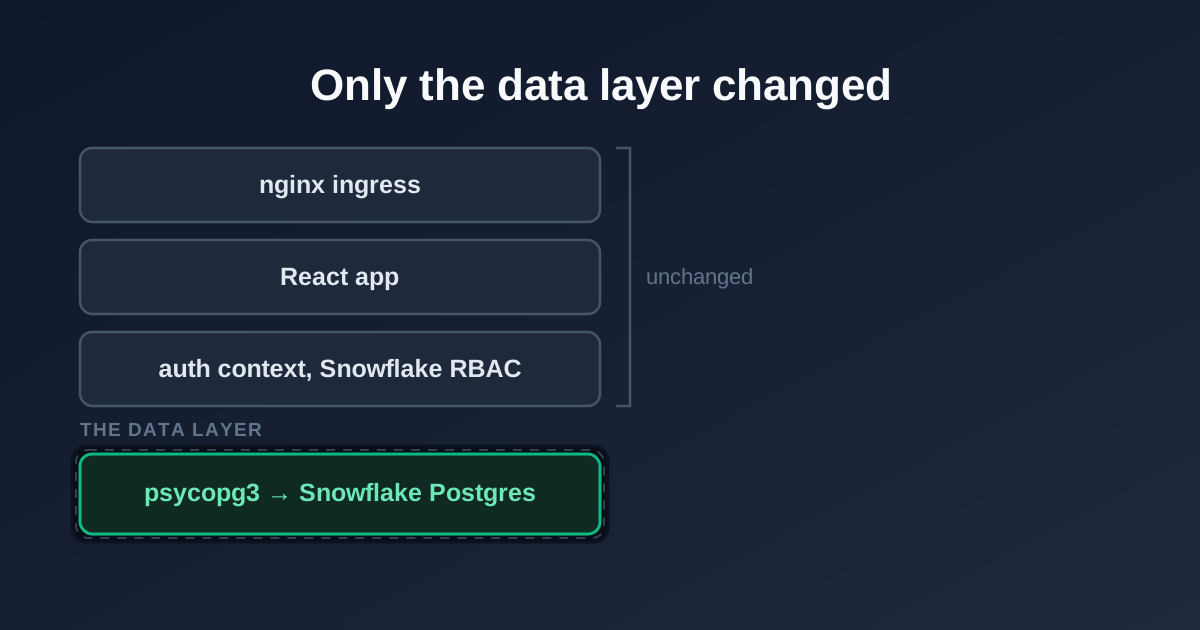
The migration in summary. Everything above the data layer was left alone.
Contents
- Why we moved OLTP off Snowflake warehouses
- Architecture and auth on Snowflake Postgres
- Porting the schema: dialect, types and indexes
- Running a Snowflake Postgres instance: sizing, maintenance, recovery
- The cutover: moving 45M rows and switching production over
- What changed, and when not to do this
1. Why we moved OLTP off Snowflake warehouses
The platform runs survey operations: a FastAPI + React frontend on SPCS, a fleet of workers polling state machines, and a control layer that prices surveys in near-real-time. The workload profile:
- Max 5K-row upserts per operation
- OLTP read patterns (single-survey lookups, state checks every few seconds)
- <20 concurrent internal users
- Control tables in the tens of thousands of rows; response tables in the tens of millions
Snowflake warehouses are built for online analytical processing (OLAP), and they are good at it. Pointing them at this workload meant paying cold-start tax on every worker tick and accepting hundreds-of-ms tails on queries that, on any indexed Postgres, would return in single-digit ms. The only way to keep the latency tolerable was to leave an operational warehouse running 24/7, a billed run rate of around £5,000/month to do work that an indexed Postgres dispatches in microseconds. Snowflake Postgres reaching GA in February 2026 (built on the Crunchy Data acquisition, PG 16/17/18 supported, we run 18) gave us a way to fix that without leaving the account.
What stays on Snowflake:
- Auth.
SHOW GRANTS OF ROLEis still the authority. Role membership drives page-level access in the React app. - Analytical workloads. Dynamic Tables and the transformations built on them stay on the warehouse, and we didn’t touch any of that. They keep working because the operational tables get mirrored back into Snowflake, which is the last section below.
What moved to Snowflake Postgres: all operational tables, from control records, state managers, survey metadata, bot-detection scores and reconciliation data to the internal tables behind a couple of secondary analytics features.
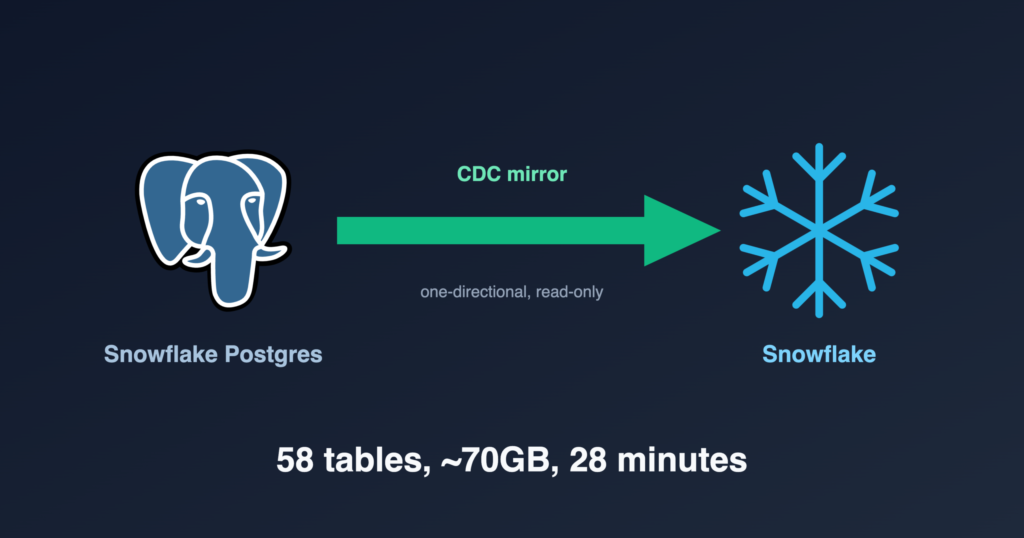
That leaves one open question: with the operational data off the warehouse, how do analysts still query it? We mirror it back. Native Snowflake Postgres mirroring streams the Postgres tables continuously into a read-only Snowflake database, so the operational data lands next to the analytics that consume it. The full arc is migrate off the warehouse for OLTP, then sync back for OLAP; the mirroring setup is a companion write-up of its own.
2. Architecture and auth on Snowflake Postgres
The networking surprise
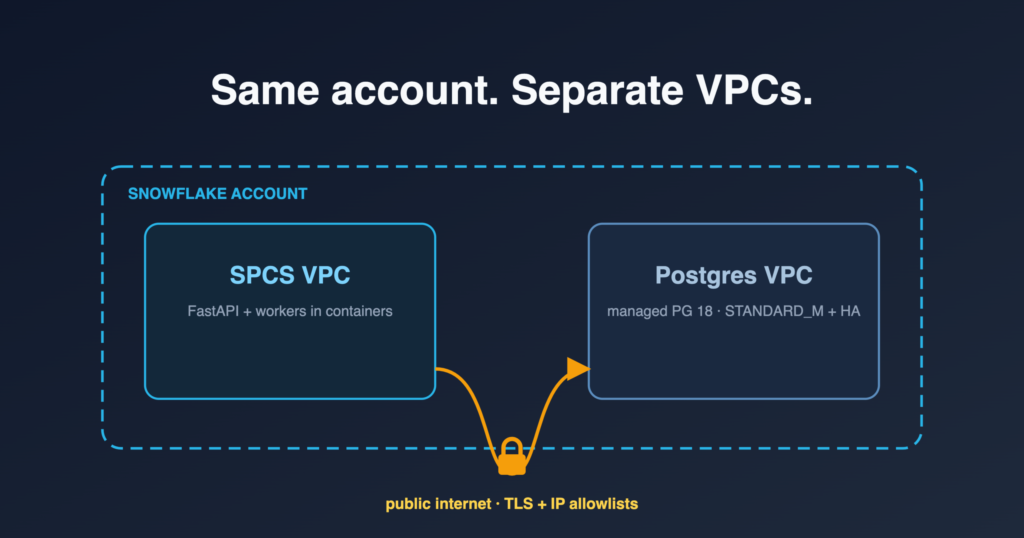
The single biggest surprise: SPCS and Snowflake Postgres run in separate VPCs, and traffic between them crosses the public internet even inside one account, mitigated by SSL (sslmode=require) and IP allowlists. If you assume an internal VPC fabric like RDS-in-the-same-VPC-as-your-EKS-cluster, your latency budget and your security review will both be wrong.
To get it working you need three things: a POSTGRES_INGRESS network policy for who can reach the instance, an External Access Integration (EAI) for letting containers reach out, and SPCS egress IPs that expire every 90 days. Plus one rule that prevents a self-inflicted lockout: once a policy is attached, ALTER is the only safe verb (CREATE OR REPLACE detaches it and blocks all connections).
The full walkthrough, with the ingress/egress SQL, the egress-IP refresh task, and the local-dev IP recipe, is in the companion how-to: Networking Snowflake Postgres from SPCS.
Before and after
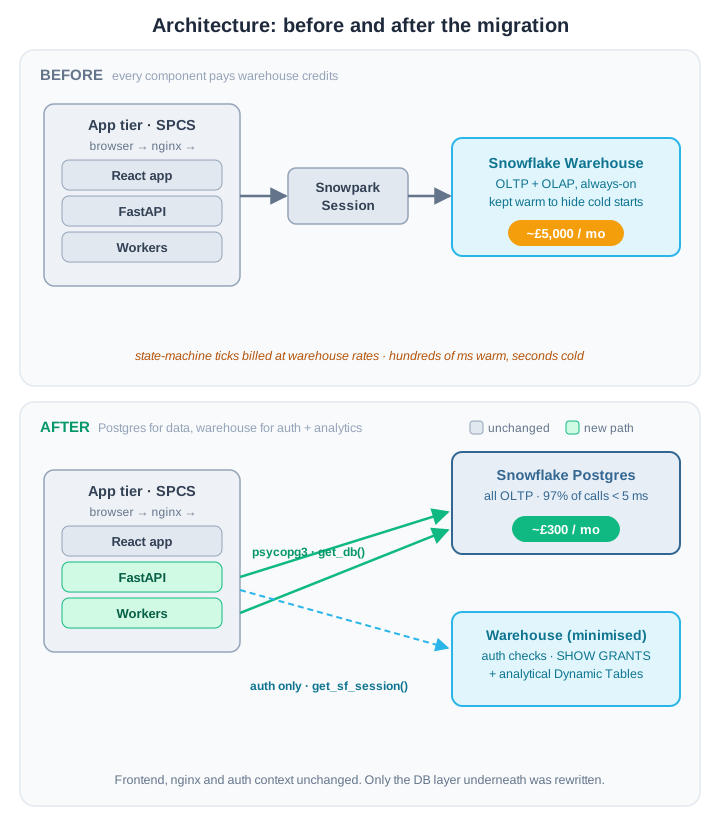
Before, everything funnels through a Snowpark session into one always-on warehouse. After, FastAPI and workers reach Snowflake Postgres over psycopg3, while an auth-only path keeps SHOW GRANTS and the analytical Dynamic Tables on a minimised warehouse. Frontend and nginx are untouched.
Before, every component, regardless of workload shape, went through a Snowpark session and a warehouse. The warehouse was paying for state-machine ticks.
After, the frontend, nginx ingress, and authentication context are unchanged. The DB layer underneath is rewritten. Two FastAPI dependencies now exist where there was one: get_db() returns a thread-local Postgres connection; get_sf_session() is kept exclusively for /auth/check-roles and /auth/me.
Auth: two concerns, one user
Two separate auth problems get conflated easily:
| Concern | Mechanism | Authority |
|---|---|---|
| App → Postgres (DB connection) | Static password for application service account, injected at deploy via GitHub Secrets |
Snowflake Postgres |
| User → app (role-based access control, RBAC, for pages and endpoints) | SHOW GRANTS OF ROLE via a per-request Snowpark session |
Snowflake |
We deliberately did not use GENERATE_POSTGRES_ACCESS_TOKEN_FOR_USER() for the first row. A static password rotated on demand beats a 15-minute token that needs a live Snowpark session to mint; the reasoning is in the connection-layer write-up.
The frontend AuthContext, ProtectedRoute, and pageRoles.ts are untouched. The migration only changed where data queries go, not where auth checks go.
# Two FastAPI dependencies, two backends
@router.get("/check-roles")
def check_roles(session: Session = Depends(get_sf_session)):
    # SHOW GRANTS OF ROLE; Snowflake remains the authority
    ...

@router.get("/surveys/{survey_id}")
def get_survey(survey_id: int, conn = Depends(get_db)):
    # Per-thread Postgres connection from PGConnectionManager
    ...
The connection layer
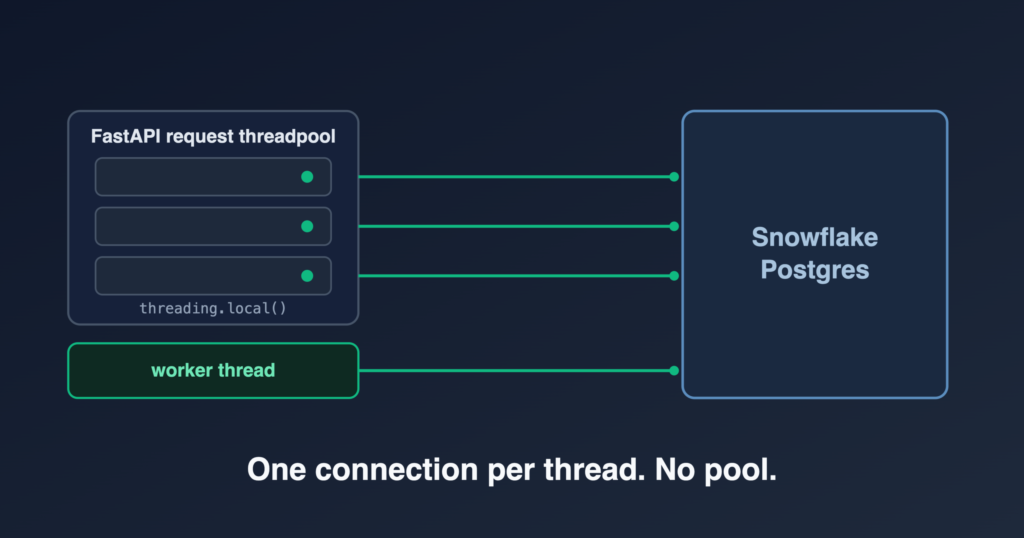
The driver is psycopg3, with one connection per thread cached in threading.local() and no connection pool on either the client or the server side. That keeps every reconnect and recycle on the thread that asked for the connection, with no background threads anywhere, plus three details that keep cached connections alive: a SELECT 1 health check before reuse, exponential-backoff reconnect, and recycling by age.
It is enough of a topic on its own that it lives in a companion how-to: Connecting to Snowflake Postgres: psycopg3 without a pool.
3. Porting the schema: dialect, types and indexes
The dialect cheatsheet
Most of the porting work was mechanical. The patterns that came up dozens of times:
| Snowflake | Postgres |
|---|---|
VARIANT / OBJECT / ARRAY |
JSONB |
TIMESTAMP_NTZ / TIMESTAMP_LTZ |
TIMESTAMP / TIMESTAMPTZ |
PARSE_JSON(s) |
s::jsonb |
OBJECT_CONSTRUCT('k', v) |
jsonb_build_object('k', v) |
data:settings:max_cpi::FLOAT |
(data->'settings'->>'max_cpi')::float |
LATERAL FLATTEN(input => arr) |
LATERAL jsonb_array_elements(arr) |
MERGE INTO ... WHEN MATCHED ... |
INSERT ... ON CONFLICT (...) DO UPDATE SET ... |
QUALIFY ROW_NUMBER() OVER (...) = 1 |
Subquery with WHERE rn = 1 |
IFF(c, a, b) / NVL(a, b) |
CASE WHEN c THEN a ELSE b END / COALESCE(a, b) |
DATEADD('minute', -N, ts) |
ts - INTERVAL 'N minutes' |
LISTAGG(col, ',') |
STRING_AGG(col, ',') |
? / :1 placeholders |
%s (psycopg) |
| Identifiers UPPERCASE by default | Identifiers lowercase by default |
The casing flip is the easiest one to underestimate. Decide upfront: lowercase everywhere in Postgres (we did this), or quote every identifier (ugly, but compatible). Doing it inconsistently is the worst option.
Schema and indexing
We collapsed the multiple Snowflake databases into a single Postgres database with one schema per module, mirroring the old Snowflake database layout. The managed application role owns the schemas; the snowflake_admin superuser is reserved for CREATE DATABASE and CREATE EXTENSION and nothing else.
Indexes are the most important thing you carry over. Snowflake’s micro-partition pruning hides a lot of single-key access patterns; Postgres needs an explicit index for the same trick. Every Snowflake cluster key needs a B-tree index. Watch for tables where the primary key (PK) column order doesn’t match query patterns. One of the largest tables had a PK of (respondent_id, survey_id) but every query filters on survey_id first. The PK index doesn’t serve those queries; a standalone (survey_id) index does.
Useful extensions (install at database level):
CREATE EXTENSION IF NOT EXISTS pgcrypto;            -- UUIDs, hashing
CREATE EXTENSION IF NOT EXISTS pg_stat_statements;  -- query perf monitoring
-- pg_cron is NOT available; schedule from SPCS instead
4. Running a Snowflake Postgres instance: sizing, maintenance, recovery
Sizing and maintenance
Instance families available at GA: Burstable (BURST_XS/S/M), Standard (STANDARD_M through STANDARD_24XL), Memory-optimised (HIGHMEM_L through HIGHMEM_48XL). Verify specs against the current docs; they shift.
We run a single STANDARD_M instance (consistent perf during heavy index builds and migration runs, ~£300/mo). Local development points psycopg at a Docker Postgres on a laptop (same schema, same migration script, no cloud cost, faster iteration) instead of running a second SF Postgres instance. Resize is a single statement with no connection-string change:
ALTER POSTGRES INSTANCE <name> SET COMPUTE_FAMILY = 'STANDARD_L';
Pin the maintenance window, or Snowflake picks for you. One statement:
ALTER POSTGRES INSTANCE <name> SET MAINTENANCE_WINDOW_START = 2; -- 02:00–05:00 UTC
High availability (HA) instances do maintenance with a rolling standby swap: sub-minute connection drop, no data loss.
Disaster recovery
Snapshots are vendor-managed: no pgBackRest, no pg_basebackup, no self-managed point-in-time recovery. In return, the first two layers are free. The two numbers that matter are the recovery point objective (RPO, how much data you lose) and the recovery time objective (RTO, how long you are down).
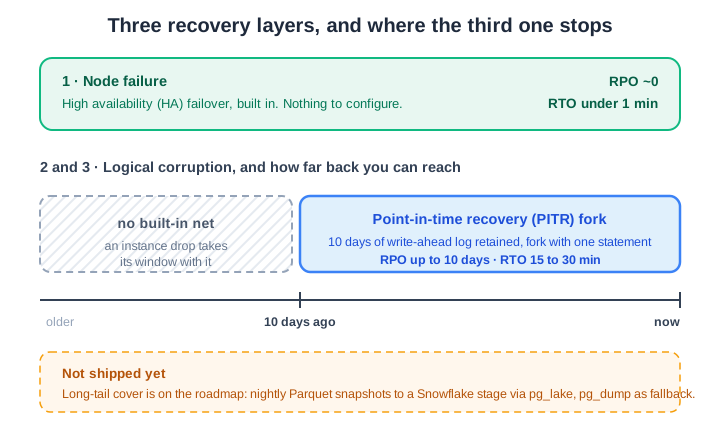
HA failover covers node loss with no configuration. Point-in-time recovery forks cover logical corruption for 10 days. Past that there is no built-in net, and closing that gap is still on the roadmap.
| Failure | Mechanism | RPO | RTO |
|---|---|---|---|
| Node failure | HA failover (built-in) | ~0 | < 1 min |
| Logical corruption / bad migration (≤ 10 days) | PITR fork | ≤ 10 days | 15–30 min |
Point-in-time recovery (PITR) forks are why this DR story works at all. The instance retains 10 days of write-ahead log (WAL); you fork to a new isolated copy at any point in that window with one statement, then either swap PG_HOST to cut over to the fork or pull individual tables out of it:
CREATE POSTGRES INSTANCE <recovery-name>
  FORK <prod-name>
  BEFORE (TIMESTAMP => '2026-05-20 12:34:00'::TIMESTAMP_LTZ)
  COMPUTE_FAMILY = 'STANDARD_M'
  STORAGE_SIZE_GB = 50
  HIGH_AVAILABILITY = FALSE;            -- recovery fork doesn't need HA

ALTER POSTGRES INSTANCE <recovery-name>
  SET NETWORK_POLICY = '<existing-policy>';   -- inherits the same allowlist
Drop the fork when you’re done. No backup files, no restore tool, no S3 bucket, just SQL. If your laptop needs access to the fork for ad-hoc recovery (psql, DBeaver, Python), the local-dev IP-whitelist recipe from the networking how-to applies: the local-dev rule stays attached to the existing policy, so the fork is reachable as soon as you ALTER it.
Beyond the 10-day window there is no built-in safety net: an instance drop takes its PITR window with it, and a bug discovered three weeks later is too late for a fork. Long-tail catastrophic-loss coverage is on the roadmap: likely nightly Parquet snapshots to a durable Snowflake stage via pg_lake (the Snowflake-Postgres extension that exposes PG tables as Iceberg artefacts on a stage), with pg_dump to a stage as the fallback if pg_lake isn’t enabled. Both options keep artefacts inside the account boundary. We haven’t shipped it yet; the operational risk it covers is low for this workload but real for some. Worth planning for if your RPO target stretches past ten days.
5. The cutover: moving 45M rows and switching production over
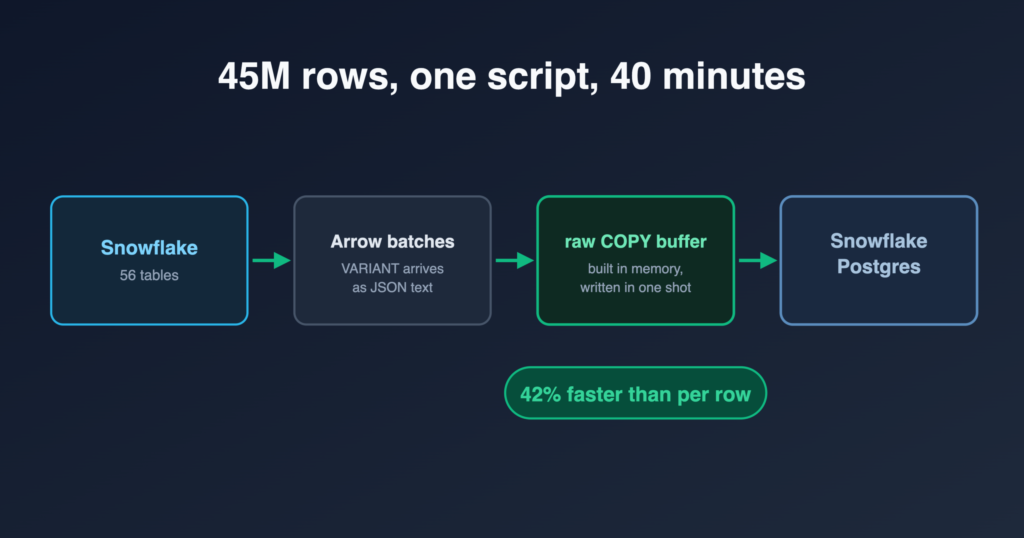
One script moved 56 tables and ~45M rows in ~40 minutes. The load streams Arrow batches into a raw TEXT-format COPY buffer, which measured 42% faster than per-row writes because Snowflake hands back VARIANT columns already serialised as JSON strings. Schema comes from DESC TABLE against the live source rather than checked-in DDL, so the script always builds against what is actually there.
The script has to run from inside SPCS as an EXECUTE JOB SERVICE: GitHub Actions runners have no IP allowlist entry and cannot reach the instance at all. Production then switched over in single-digit minutes with a hard cutover and no dual-write, backed by a reverse-migration script that syncs Postgres back to Snowflake with three write modes.
The full procedure, the COPY buffer code, the CI/CD changes and the rollback modes are in the companion how-to: Snowflake Postgres migration: the script and the cutover.
6. What Snowflake Postgres changed, and when not to do this
The second saving: the architecture we couldn’t afford on warehouses
The £5k → £300 line item is the headline. The bigger long-term win is architectural, and it’s easy to miss if you only look at the compute bill.
The client’s workload is naturally a continuous producer-task: workers consuming events as they happen, each producing a few rows of state. Low concurrency, steady throughput. You can’t build that on a warehouse: continuous producers mean either running it 24/7 (the £5k) or paying cold-start tax on every tick. So we did the standard workaround, batch on a schedule, and paid for it twice:
- A heavier warehouse. The batch spike set the warehouse size, not the steady state, so it ran one or two notches larger than the equivalent continuous workload needed. The containers were only issuing the queries through a Snowpark session; the compute that had to grow was the warehouse executing them.
- It still didn’t go idle. Even at the most aggressive sensible interval, the warehouse was active ~80% of wall-clock hours in the months before cutover; cron batches, dashboard refreshes and ad-hoc queries kept it warm. We paid the latency tax of batching without most of the saving it was meant to buy.
On Postgres neither applies. A worker tick is microseconds and effectively free, so we moved back to the producer-task design we wanted from the start: a 60-second poll that scans for work and dispatches. State changes propagate in seconds, not minutes, and the peak we provision for drops to roughly a third of the batch-era warehouse, a further saving on top of the headline.
If you’re already on Snowflake and quietly gave up on producer-task internal services because the warehouse maths didn’t work, this is the design you can have back.
What we’d do differently
- Run the schema audit as its own step, days ahead. Doing it on the night leaves no room to react to whatever it reports.
- Decide identifier casing on day one. Lowercasing everything in PG avoided a quoting nightmare.
- Skip token-bridge auth for service accounts. A static password rotated on demand beats the refresh logic
GENERATE_POSTGRES_ACCESS_TOKEN_FOR_USER()forces into the connection layer. - Have the IP-refresh path written and tested before the egress ranges rotate. The 60-day advance signal is generous, but only if you are ready to use it (we run it by hand; see the networking how-to for why).
When this pattern isn’t for you
Four cases where the engineering effort doesn’t pay back:
- Your “OLTP” is genuinely transactional throughput. Hundreds of thousands of writes per second, multi-region active-active, sub-millisecond p99 budgets: Snowflake Postgres is sized for typical operational workloads, not extreme transactional systems. Benchmark before you commit.
- You need extensions outside the allowlist. Vendor-managed Postgres means a fixed extension set.
pg_cron,pglogical, custom C extensions, and most things you’d build yourself aren’t options. Check the allowlist against your dependency list before scoping the migration. - You need self-directed major-version upgrades. PG major-version timing is Snowflake’s call. If your app is on a tight PG-version contract (e.g., shipping a customer-facing schema that depends on PG 18-specific features the day they GA), the vendor-controlled cadence may not fit.
- You don’t have a meaningful operational footprint on Snowflake. If your warehouse spend is dominated by genuine analytics and the operational tail is a handful of small tables, the migration cost won’t clear. The signal is the always-on operational warehouse line item: if you don’t have one, you don’t have this problem.
For the broader business framing of these disqualifications, the business case for moving OLTP off Snowflake warehouses covers them at the buying-decision level.
The shape of the win
The local-dev story is the under-rated win, and the one that paid off fastest: docker compose up now stands up a real Postgres with the production schema and migrated data, integration tests run against it, and the Snowpark mock-vs-real divergence is gone.
The runtime story is the numbers. Across 35M queries over a 24-day window (pg_stat_statements, mean_exec_time weighted by calls), the call-weighted mean was 0.6 ms; 97% of calls returned under 5 ms, 97.6% under 10 ms. Compute is a flat ~£300/month (STANDARD_M + HA + storage), down from ~£5,000 for the always-on warehouse: a 94% cut on that line. We kept the Snowflake ecosystem, same account, RBAC, governance and vendor, and just stopped using its most expensive primitive for its least suitable workload.
If your stack looks like this one, this pattern is repeatable. It starts with one question: are warehouse credits paying for state-machine ticks? If yes, the fix is bounded, the rollback path is real, and the bill stops being surprising.
FloreData leads the platform team at a market research company. The migration described here ran in production.
The Snowflake Postgres series: the business case · the migration write-up · cross-VPC networking · the psycopg3 connection layer · the migration script and cutover · mirroring back into Snowflake.